

Finding Value in the Noise: A Guide to Setting Up Your First Screener
Updated on 04 Dec 2025, 18:30

In the world of retail investing, the problem isn’t a lack of information - it’s an abundance of it. With thousands of stocks trading across global exchanges, finding the few that align with your financial analysis can feel like searching for a needle in a haystack.
At Value Sages, we believe that confident investing starts with a structured, educational approach. A screener shouldn't just list stocks, it should help you identify businesses that fit the valuation criteria you define.
Today, we are walking you through how to set up your first model-based screener on the Value Sages platform. This tool allows you to filter not just by price or sector, but by theoretical intrinsic value and margin of safety based on your own assumptions.
1. Define Your Valuation Model
When you first navigate to the Screener page, you aren't just asked for a P/E ratio, you are asked to define the assumptions you want to test.
The Model tab is where you set the core inputs for your Discounted Cash Flow (DCF) calculation. This tool functions as a calculator for your expectations:
- Growth Rate: What is the conservative annual growth you want to project?
- Margin of Safety (MoS): How much of a discount to your calculated value do you require?
- Discount Rate: What is your required rate of return?
Note: By default, the system helps you start with an Exit Multiple of 15 for terminal value calculations, though you should adjust your inputs to match your specific analysis.
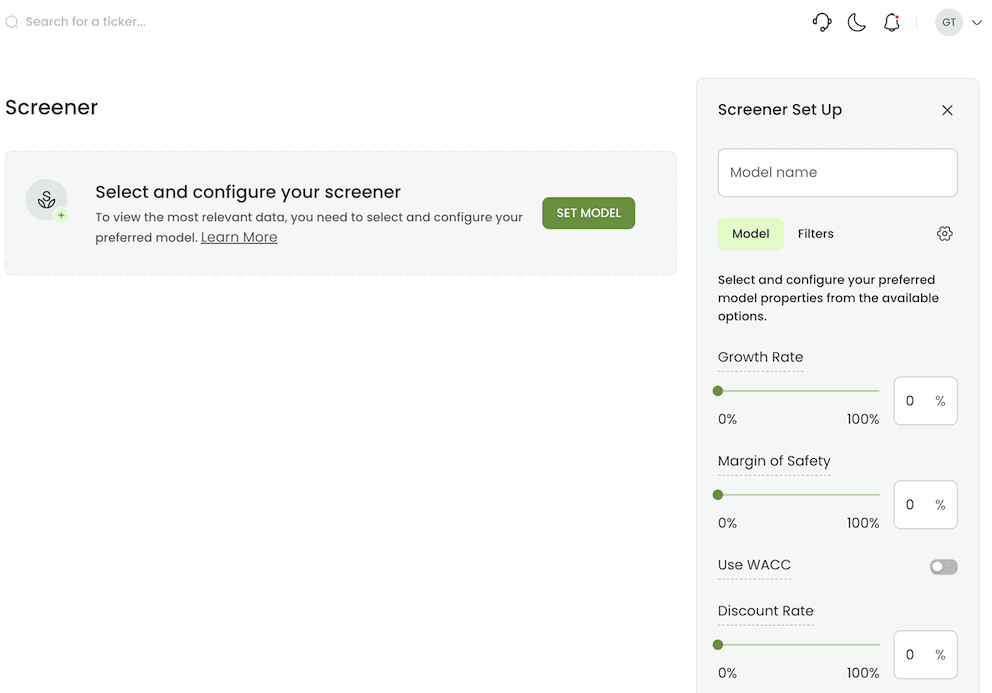
Figure 1: Setting the core DCF parameters. Here, you define the “rules“ of your valuation universe.
2. Narrow the Universe
Once you have established your valuation logic, you need to define your search ground. Switching to the Filters tab allows you to sort through the data using traditional metrics.
You might want to focus on a specific geography (e.g., The Netherlands), a particular sector, or companies of a certain size (Market Cap). You can also filter by various other metrics, such as 52-week low/high to find stocks trading at the lower end of their historical range.
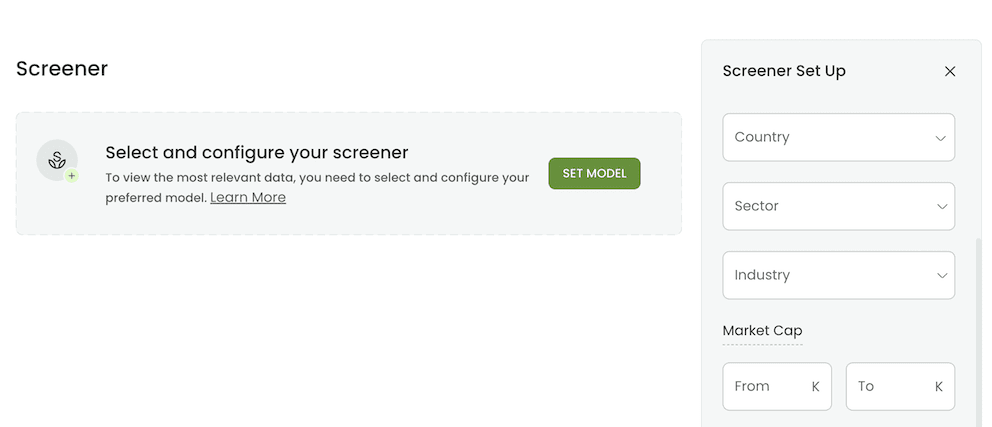
Figure 2: Applying traditional filters to narrow the search scope by country, sector, and price action.
3. Customize Your Configuration
Flexibility is key to analysis. Sometimes you want a quick filter based on price, other times, you want a deep valuation scan. The configuration menu allows you to toggle between a simple filter view and a comprehensive model view.
For users focused on intrinsic value, keeping the Model settings active is crucial - it ensures that every result is screened against the specific parameters you have set.
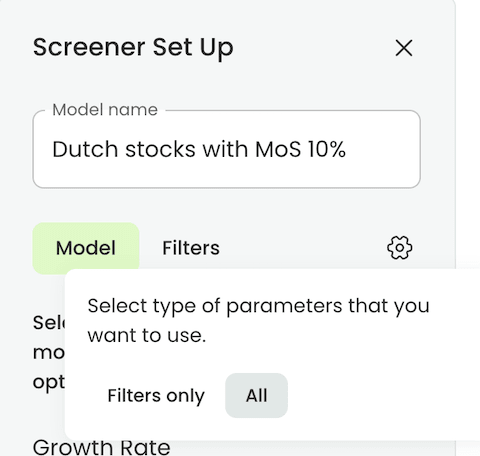
Figure 3: Customizing the screener to include or exclude valuation model settings.

Analyze companies with transparency, confidence, and full control.
Try Value Sages Free4. A Practical Example: Dutch Value Stocks
Let’s put this into practice. Suppose we are researching the Dutch market (AEX/AMX). We want to find companies that appear undervalued relative to a specific set of conservative estimates.
In this example, we configure the model with:
- Growth Rate: 3% (Conservative Input)
- Margin of Safety: 10% (The discount we wish to test for)
- Discount Rate: 10% (Our theoretical required return)
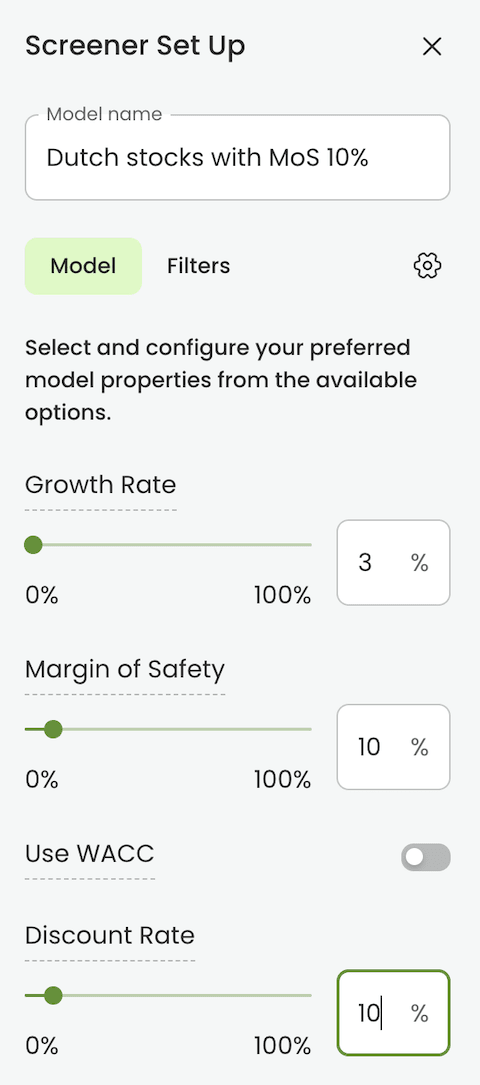
Figure 4: A sample configuration targeting Dutch stocks with a 10% Margin of Safety input.
5. Analyzing the Results
This is where the tool differentiates itself. The screener calculates a Theoretical Fair Value for each company based strictly on your inputs.
In the results below, you can see the MoS (Margin of Safety) percentage calculated dynamically for each stock. This allows you to instantly see the disparity between the current market price and the value derived from your model settings.
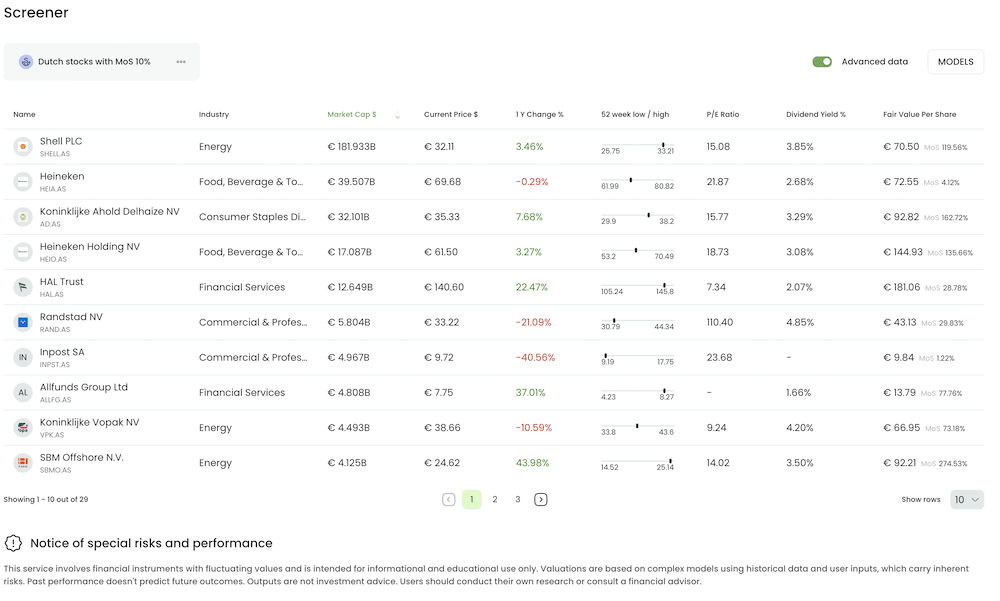
Figure 5: The results dashboard displaying Theoretical Fair Value estimates and calculated Margin of Safety.
6. Seamless Deep Dive
The screener is just the starting point for your research. When you identify a company of interest in the results list and click on the ticker, Value Sages takes you directly to that company’s Ticker Overview page.
Crucially, the system automatically carries over your screener settings. The DCF model on the analysis page will be pre-populated with the Growth Rate, Discount Rate, and Margin of Safety you defined in the screener. This allows you to seamlessly continue your educational journey, tuning the parameters further based on your specific research into that company's financial statements.
Summary
The Value Sages screener is designed to save you time while allowing you to apply rigorous, user-defined standards to your market research. By combining traditional filtering with dynamic valuation modeling, it helps you build a watchlist of candidates for further research in minutes.
Ready to start your analysis? Log in to the App and set up your first screen today.
Note: The DCF model analysis is a feature available for pro subscribers. For more details on subscription options, please visit our pricing page.
 Disclaimer - No Investment Advice
The content provided on this Website is for educational and informational purposes only. It does not constitute financial, investment, or legal advice. Users should conduct their own research and/or consult professional advisors before making any investment decisions. SAGES LTD is not responsible for any financial losses incurred based on the information provided.


